
longhornfreak
Legacy Members
-
Joined
-
Last visited
Everything posted by longhornfreak
-
 Night shift getting it done last night! Sent from my iPhone using Tapatalk
 -
Night shift getting it done last night! Sent from my iPhone using Tapatalk
-
RGL with new cryptic tweet, didn’t want this to slow down. Hahah! Sent from my iPhone using Tapatalk
-
So is the night crew calling Urban not happening officially? Man.... Sent from my iPhone using Tapatalk
-
I thought about this too, but what is he supposed to say? There isn't an opening at Texas. Maybe he could make a blanket statement saying he is happy on set and he isn't going to coach again.
-
When does the night crew come in? I like what they are cooking.
-
I'm in!!
-
RATS!!!
-
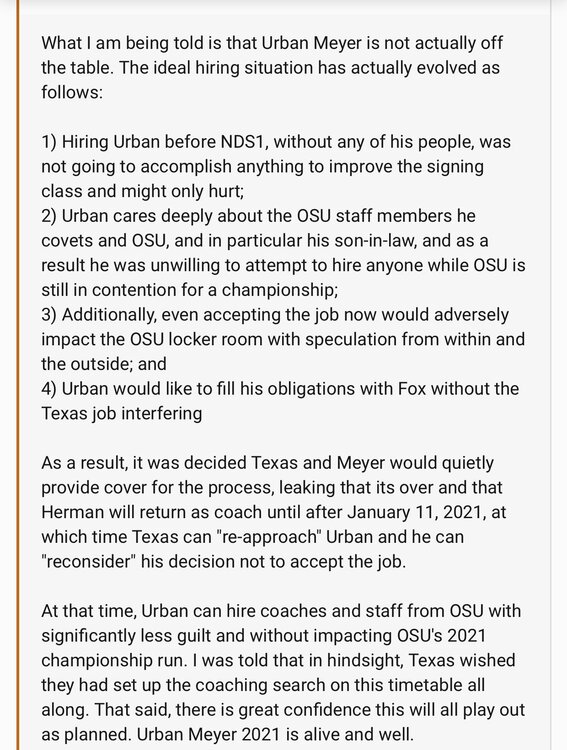
Don't shoot the messenger:
-
We lost yesterday, but the sun came up this morning. Did I do that right?
-
Plan B:

-
The trifecta of UT losses yesterday. Bummer!
-
Sources: Jeff Fisher was spotted at Bill Miller's, confirming order.
This is awesome
Certifiable buds
Solid info!
Brilliant!!!!
"The sun came up today, so that's good". Book it!





Football ...
Basketball ...
Baseball ...
Other Sports ...
Futbol ...
🤫995🤫 ...
Gambling ...
Movies & TV ...
Music ...
Hobbies ...
Lulz ...
Food & Travel
...
Daily Texan ...
Business & Markets ...
Cloak Room ...
Help ...
For Sale ...
Board Discussion ...
Advertise...
Tailgate Donations