Message Board User
Legacy Members
-
Joined
-
Last visited
Everything posted by Message Board User
-
This is going to be a fascinating free agency to watch; if Daniel Jones can get a $160 million contract...
Truth.
At least it's happening this year (the last season where the Cavs hold their first round pick) and not in the next...what...5 years?
Shot: Chaser:
The funny thing about that song is that she says she is managing her diabetes well.
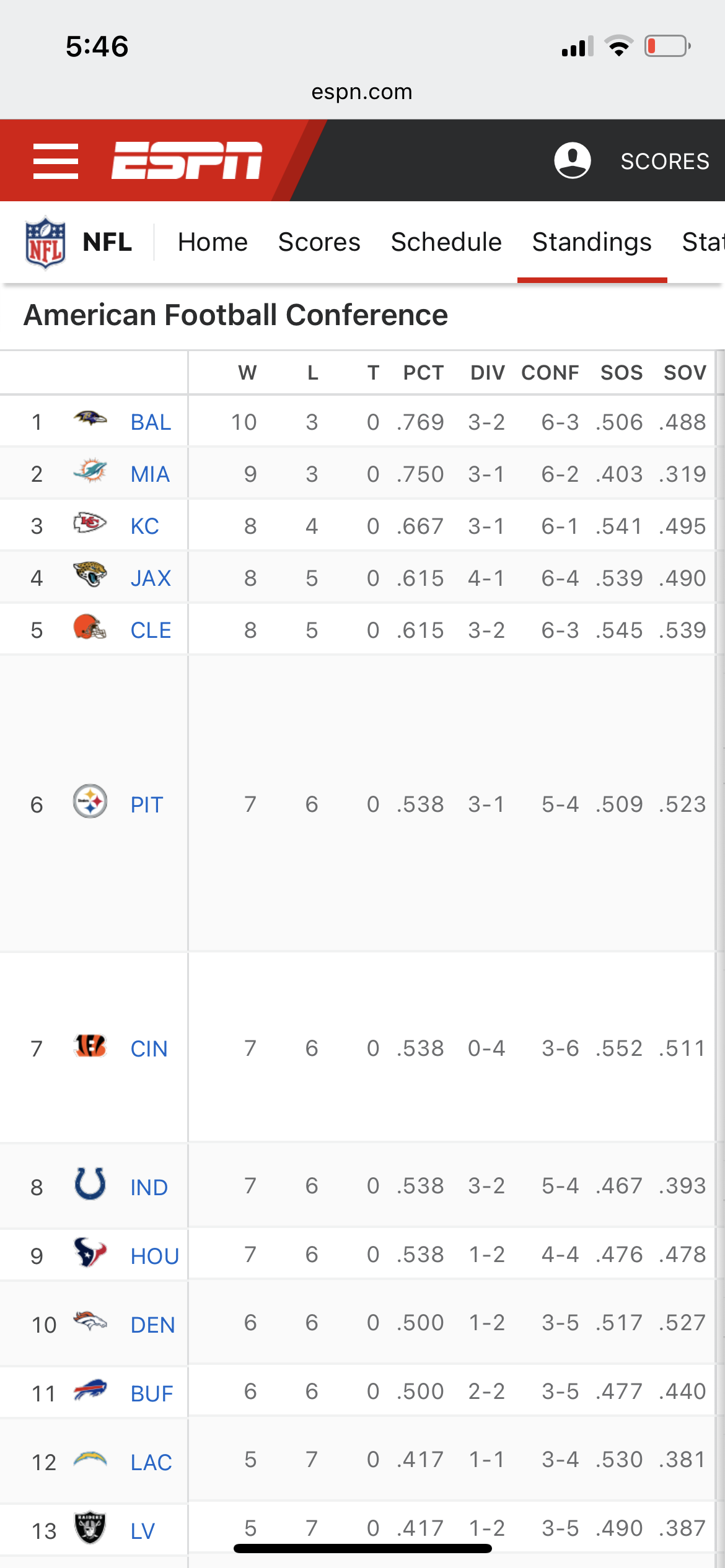
All 4 AFC North teams would be in if the playoffs started today (yes I know I need to charge my phone).
 MJ never won the NBA cup. Just sayin...
So I looked up at Minnesota is 17-4. And Rudy is playing out of his mind. If this keeps up through this season, I'll be disappointed if @MNLonghornFUKM doesn't rub it in all of our faces given all of the shit he took for the trade.
Well done sir.
How many first downs now?
It's been how many days since Ohio State has beaten Michigan?
Houston, OKC, Minnesota... 😲
Really fortunate for Giddey that Oklahoma's age of consent is 16.
Yep - and twitter/tiktok is already on it.
Look who thinks he's Sam Wyche...
Football ... Basketball ... Baseball ... Other Sports ... Futbol ... 🤫995🤫 ... Gambling ... Movies & TV ... Music ... Hobbies ... Lulz ... Food & Travel ... Daily Texan ... Business & Markets ... Cloak Room ... Help ... For Sale ... Board Discussion ... Advertise... Tailgate Donations
MJ never won the NBA cup. Just sayin...
So I looked up at Minnesota is 17-4. And Rudy is playing out of his mind. If this keeps up through this season, I'll be disappointed if @MNLonghornFUKM doesn't rub it in all of our faces given all of the shit he took for the trade.
Well done sir.
How many first downs now?
It's been how many days since Ohio State has beaten Michigan?
Houston, OKC, Minnesota... 😲
Really fortunate for Giddey that Oklahoma's age of consent is 16.
Yep - and twitter/tiktok is already on it.
Look who thinks he's Sam Wyche...
Football ... Basketball ... Baseball ... Other Sports ... Futbol ... 🤫995🤫 ... Gambling ... Movies & TV ... Music ... Hobbies ... Lulz ... Food & Travel ... Daily Texan ... Business & Markets ... Cloak Room ... Help ... For Sale ... Board Discussion ... Advertise... Tailgate DonationsAccount
Search
Configure browser push notifications
Chrome (Android)
- Tap the lock icon next to the address bar.
- Tap Permissions → Notifications.
- Adjust your preference.
Chrome (Desktop)
- Click the padlock icon in the address bar.
- Select Site settings.
- Find Notifications and adjust your preference.
Safari (iOS 16.4+)
- Ensure the site is installed via Add to Home Screen.
- Open Settings App → Notifications.
- Find your app name and adjust your preference.
Safari (macOS)
- Go to Safari → Preferences.
- Click the Websites tab.
- Select Notifications in the sidebar.
- Find this website and adjust your preference.
Edge (Android)
- Tap the lock icon next to the address bar.
- Tap Permissions.
- Find Notifications and adjust your preference.
Edge (Desktop)
- Click the padlock icon in the address bar.
- Click Permissions for this site.
- Find Notifications and adjust your preference.
Firefox (Android)
- Go to Settings → Site permissions.
- Tap Notifications.
- Find this site in the list and adjust your preference.
Firefox (Desktop)
- Open Firefox Settings.
- Search for Notifications.
- Find this site in the list and adjust your preference.