


Lurch
Legacy Members
-
Joined
Everything posted by Lurch
-
 Still can’t pay for play, I believe, so no obligation for post season or any other game for that matter
 -
Just vdrums, electric guitar, bass, keyboard and final vocals. Mic is primarily for singing. Guitar I can start with just direct plugin but later will play around w mic on amp
-
Thanks, I recall the monster hdmi cables being bullshit, too, but wasn’t sure about MIDI. The drum run is probably 20’ so I wanted to make sure they were quality enough to push that
-
This is working now. Reindexing seemed to do the trick
-
Yeah, I put this in the other thread too: Unread Content seems to have stopped working in the last few hours for me on all browsers
-
FWIW as a long time Tapa advocate, I switched to App Mode in Safari on my iphone and ipad with this site change and I'm now totally fine with it.
-
Unread Content seems to have stopped working in the last few hours for me on all browsers
-
-
I can't recreate it in Chrome though I saw it earlier and thought the site was down. I just jumped over to Edge to try it and I saw the Oops! girl for just a split second before it redirected to the proper page. I then tried it in incognito mode and again saw it for just a split second and saw some language about bot checking. I cannot recreate it anymore in either browser.
-
I'm currently at 134GB of 500GB available on my macbook. What size External HD would you go with?
-
My thinking was to just validate connections, etc. with GarageBand, but I see now that there's a free 90 day trial for Logic Pro so really no reason not to just start with it to your point
-
Priority Type Product Price Range High Audio Interface Scarlett 4i4 $300 High Keyboard Roland FP-10 $500 High Keyboard Stand Liquid Stand $80 High Midi Cable (Keyboard 20') D'Adarrio $31 High Mic (voice) SM58s $120 High Mic Stand InnoGear Desktop Stand $20 High Mic cable (voice) Cable Matters 3' XLR $17 High Midi Cable (Drum 20') D'Adarrio $31 Medium DAW Logic Pro $200 Low Headphones (drums) OneOdio A71 (wired) $30 Low Headphones (open) DT 990 $209 Low Headphones (closed) DT 770 $209 Low Mic (guitar) SM57 $109 Low Studio Monitors Adam Audio T5V $420 Low Monitor Stands Perlesmith 45" $40
-
Cool. What’s “a little” in this context? I’d guess I can probably give each 12” of space
-
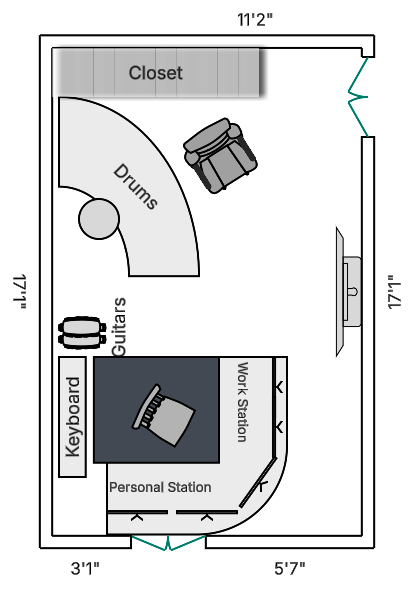
When working for my company I’ll be facing the wall with the TV on it. When doing my music I’ll be facing the bottom wall with the window as you suggest. Presumably one monitor in that lower left gap and the other on the other side of the window, my back to the drums
-
I've been toying around with how I'll fit everything in. This will be fun to set up

-
-
Was playing poker a few nights back and a few regular players were joking with the guy to my right how dour he was. I’ve played with him a ton and we chat on occasion. He seems like a good dude but I have no idea his politics. He looked at me and said softly “we have about 10 months left as a country” and we then just moved on to the next hand … what do you even say to that anymore!? What the actual fuck, all around.
-
Yeah. They want you to do it by grabbing the left side of the screen and sliding your finger right. It’s not super consistent for me, but mostly works.
-
I've been in a golf group with mostly older guys for the last few years. I've known who they were, and they've known who I am, and we've had an unstated agreement to just not go there. A few of them like to occasionally drop some dumb political jokes that I just ignore but we've mostly peacefully coexisted and had a good time together. This weekend one of them started saying the most horrendous things about Good on the 13th teebox and I just couldnt let it pass. It got real ugly for a few minutes and the final holes were dead quiet. I will not be playing in that group any more. Frankly a bit of reflection for myself the last 24 hours that I should have exited from that group long ago but perhaps was too selfish to do so. This is all so fucking weird.
-
fify (I think?)
-
There’s a “Where’s Waldo” aspect to it. Somewhere in those seemingly related words is a point, presumably. I really don’t care what the point is, but rather just want to solve the damn puzzle.
-
I honestly can’t figure out what the hell you’re saying. It appears you believe it to be quite profound though?
-
Any chance the giphy volume problem is because the widget is hitting their api with every character the user types? Seems like that should be throttled
-









Football ...
Basketball ...
Baseball ...
Other Sports ...
Futbol ...
🤫995🤫 ...
Gambling ...
Movies & TV ...
Music ...
Hobbies ...
Lulz ...
Food & Travel
...
Daily Texan ...
Business & Markets ...
Cloak Room ...
Help ...
For Sale ...
Board Discussion ...
Advertise...
Tailgate Donations