

Jump to content
View in the app

A better way to browse. Learn more.

Surly Horns

A full-screen app on your home screen with push notifications, badges and more.

To install this app on iOS and iPadOS
  1. Tap the Share icon in Safari
  2. Scroll the menu and tap Add to Home Screen.
  3. Tap Add in the top-right corner.
To install this app on Android
  1. Tap the 3-dot menu (⋮) in the top-right corner of the browser.
  2. Tap Add to Home screen or Install app.
  3. Confirm by tapping Install.
Football ... Basketball ... Baseball ... Other Sports ... Futbol ... 🤫995🤫 ... Gambling ... Movies & TV ... Music ... Hobbies ... Lulz ... Food & Travel ... Daily Texan ... Business & Markets ... Cloak Room ... Help ... For Sale ... Board Discussion ... Advertise... Tailgate Donations

NorthLoop

Legacy Members
  • Joined

Everything posted by NorthLoop

  1. NorthLoop replied to tokamak's topic in Baseball
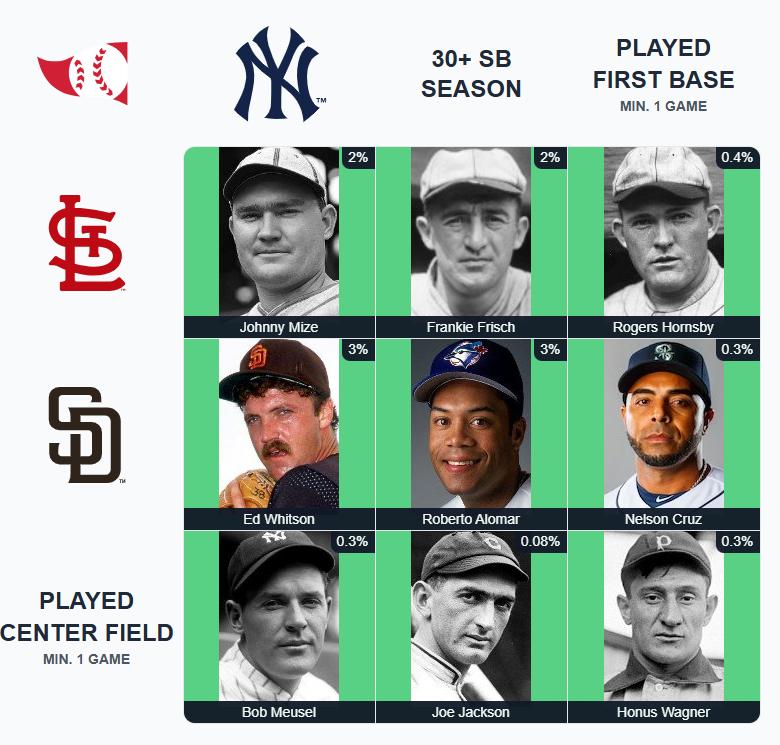
    ⚾️ Immaculate Grid 764 9/9: Rarity: 11 IMMACULATE! 🟩🟩🟩 🟩🟩🟩 🟩🟩🟩 Play at: https://immaculategrid.com/play⚾️ Immaculate Grid 764 9/9: Rarity: 11 https://immaculategrid.com/play
  2. Save some of that Zofran. Works good for hangovers.
  3. Total apologies from a bandwagon fan.... are Miro and Jason gonna be back at any time?
  4. I'll admit that I'm a bandwagon playoff fan. Holy shit that was awesome. Really made up for the UT baseball shit this weekend. Let's fucking gooooo
  5. Get him out of there
  6. Almost another baserunning gaffe. Schloss gonna make him crabwalk back to Austin.
  7. Let's get em back
  8. My in game volume and commercial volume are about 1000 decibels apart.
  9. Ok Grubbs let's hold these mofos down.
  10. Bench gaspo and borba tomorrow.
  11. @InkaUtexas i think you might get this one
  12. Let's start beaning dudes
  13. Holee shit. Announcers finally calling him out.
  14. Put your glasses on.
  15. 5 balls on a row
  16. Fuck. This. Ump.
  17. Ump cost us a run there
  18. Wow. That was a strike
Football ... Basketball ... Baseball ... Other Sports ... Futbol ... 🤫995🤫 ... Gambling ... Movies & TV ... Music ... Hobbies ... Lulz ... Food & Travel ... Daily Texan ... Business & Markets ... Cloak Room ... Help ... For Sale ... Board Discussion ... Advertise... Tailgate Donations

Configure browser push notifications

Chrome (Android)
  1. Tap the lock icon next to the address bar.
  2. Tap Permissions → Notifications.
  3. Adjust your preference.
Chrome (Desktop)
  1. Click the padlock icon in the address bar.
  2. Select Site settings.
  3. Find Notifications and adjust your preference.

