

Limp Brisket
Legacy Members
-
Joined
-
Last visited
Everything posted by Limp Brisket
-
 Pinch runner would be nice
 -
On 3 pitches lol
-
Yainer!
-
Javier will look better in the 2nd right?
-
Happy JV day
-
Yep, vintage Syndergaard. 220/221 whatever it takes.
-
Kory Lee could’ve pitched better?
-
Flexing and ruining a national broadcast is satisfying.
Good Javier, please.
I hate Chandler Rome.
No pressure Yordan
Mmm hmm
#baseball
Yeah, the relief is nails.
Offense?
He needs his head mashed, it’s been beyond annoying.
I saw Sosa hit the longest home run I’ve ever seen in person there when him and McGuire were in that roid chase.
As expected…
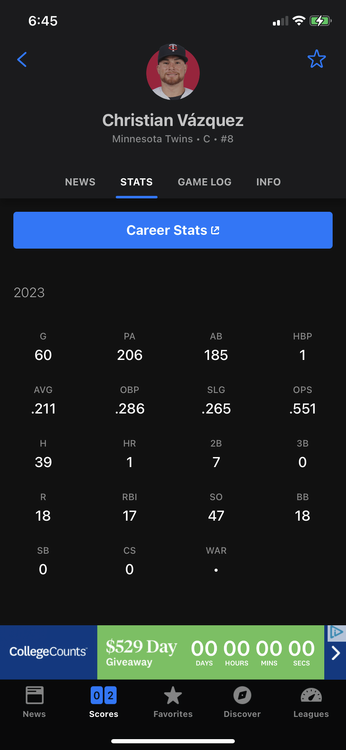
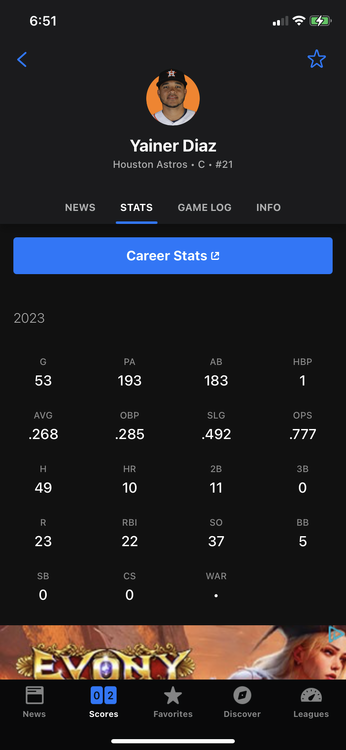 Numbers are close but Maldy’s K’s lol.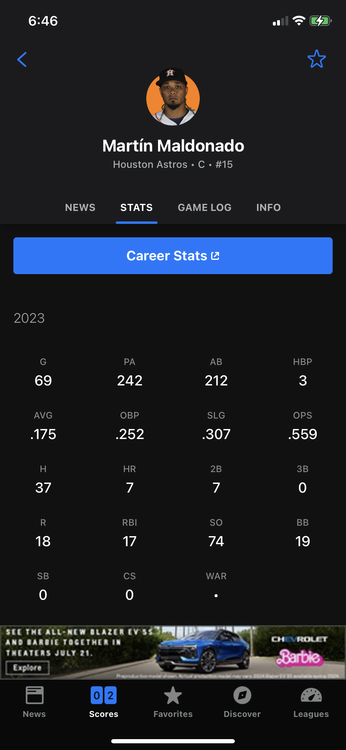
 Oh boy
Lol
This douchebag….
I thought I heard that on TV. Dusty probably not hearing it.
Shewwwwwfff…
Oh boy
Lol
This douchebag….
I thought I heard that on TV. Dusty probably not hearing it.
Shewwwwwfff…





Football ...
Basketball ...
Baseball ...
Other Sports ...
Futbol ...
🤫995🤫 ...
Gambling ...
Movies & TV ...
Music ...
Hobbies ...
Lulz ...
Food & Travel
...
Daily Texan ...
Business & Markets ...
Cloak Room ...
Help ...
For Sale ...
Board Discussion ...
Advertise...
Tailgate Donations