

jeevsie
Legacy Members
-
Joined
-
Last visited
Everything posted by jeevsie
-
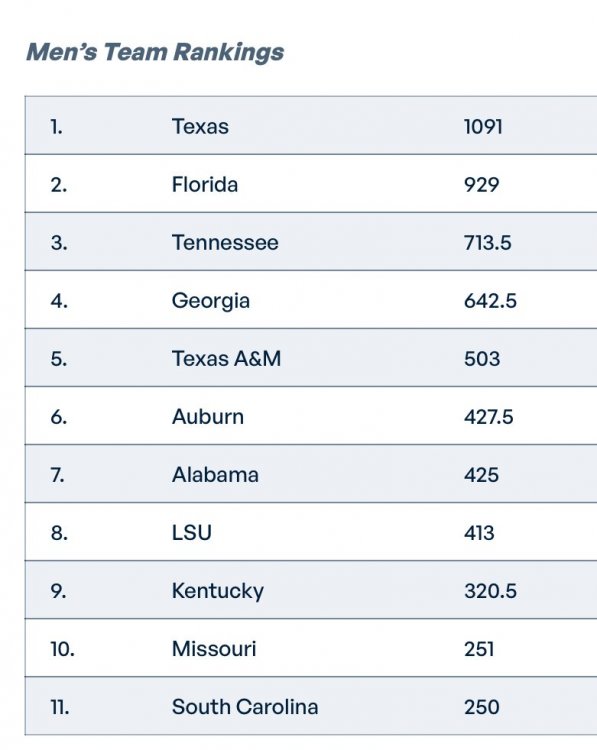
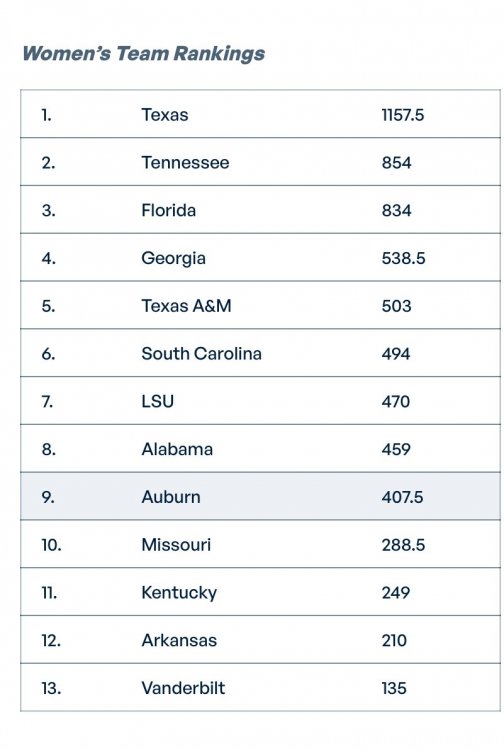
 New conference, same result. Love it!
 -
Still leading
-
1st ballot HOF wasted career
-
Motherfucker....
-
Did you include a pic with a tree?
Yup. Agent did his job.
I thought SA's mom was the spreadsheet expert around here?
Had too many Marys and not enough Williams
Just keep digging, just keep digging....
TARS
We're just gonna let this classic Helo slide on by?
Obviously a typo, but from this user.....fitting??
Nah. Someone would write a diss track.
When this happens, I'm gonna write a program where I get the extra cents. Just pennies, no one will notice.
You guys are quick. I thought - Ah, a chance for drive-by snark. I have been identified as such a poster, you know.
Keep it going. What's Westbrook up to these days?
Reported now. Traded for Patrick Baldwin. No info on what we gave up though.
We in on another trade? Kid is asking about it but I'm not seeing anything reported.
Finally watching S2 of Sprint. Great coverage of JuJu. Coach Flo gets some good screen time and is rocking the UT gear. Nice exposure!
Much excite. Can't wait for some p&r action.
(Pickle Pocket) Where's the "dumbass shit"?





Football ...
Basketball ...
Baseball ...
Other Sports ...
Futbol ...
🤫995🤫 ...
Gambling ...
Movies & TV ...
Music ...
Hobbies ...
Lulz ...
Food & Travel
...
Daily Texan ...
Business & Markets ...
Cloak Room ...
Help ...
For Sale ...
Board Discussion ...
Advertise...
Tailgate Donations
Account
Search
Configure browser push notifications
Chrome (Android)
- Tap the lock icon next to the address bar.
- Tap Permissions → Notifications.
- Adjust your preference.
Chrome (Desktop)
- Click the padlock icon in the address bar.
- Select Site settings.
- Find Notifications and adjust your preference.
Safari (iOS 16.4+)
- Ensure the site is installed via Add to Home Screen.
- Open Settings App → Notifications.
- Find your app name and adjust your preference.
Safari (macOS)
- Go to Safari → Preferences.
- Click the Websites tab.
- Select Notifications in the sidebar.
- Find this website and adjust your preference.
Edge (Android)
- Tap the lock icon next to the address bar.
- Tap Permissions.
- Find Notifications and adjust your preference.
Edge (Desktop)
- Click the padlock icon in the address bar.
- Click Permissions for this site.
- Find Notifications and adjust your preference.
Firefox (Android)
- Go to Settings → Site permissions.
- Tap Notifications.
- Find this site in the list and adjust your preference.
Firefox (Desktop)
- Open Firefox Settings.
- Search for Notifications.
- Find this site in the list and adjust your preference.